Gradient descent vs EM for dual line fitting

Here we will learn how to use JAX to perform gradient descent to fit two lines to data points that were generated by two separate processes. We will then show how to implement an EM approach that solves the same problem much faster.
import numpy as np
import matplotlib.pyplot as plt
import scanpy as sc
def generate_data(n_points=[50,50], par1 = [1,1], par2 = [1,1], noise= 50):
    x1=(np.arange(n_points[0])*par1[0]).astype(int)
    y1=(np.arange(n_points[0])*par1[1]).astype(int)
    x2=(np.arange(n_points[1])*par2[1]).astype(int)
    y2=(np.arange(n_points[1])*par2[0]).astype(int)

    x1=x1+np.random.randint(0,noise,len(x1))
    y1=y1+np.random.randint(0,noise,len(x1))

    x2=x2+np.random.randint(0,noise,len(x2))
    y2=y2+np.random.randint(0,noise,len(x2))

    xy=np.hstack([np.vstack([x1,y1]),np.vstack([x2,y2])]).T

    group=np.concatenate([np.ones(n_points[0]),np.zeros(n_points[1])])

    return x1,x2,y1,y2, xy, group
np.random.seed(42)
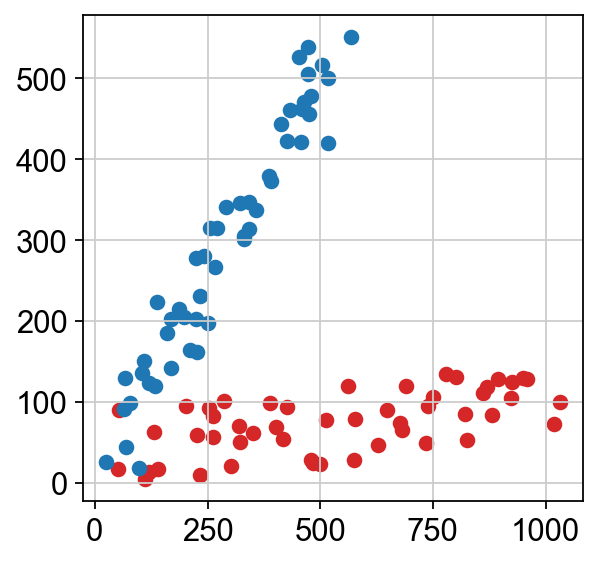
x1,x2,y1,y2, xy,group =generate_data(n_points=[50,50], par1 = [20,1], par2 = [10,10], noise= 100)
sc.set_figure_params()
plt.scatter(x1,y1,c="tab:red")
plt.scatter(x2,y2,c="tab:blue")
<matplotlib.collections.PathCollection at 0x17fd8a1d0>
# Normalizing between 0 and 1 for better consistency between parameters
xy=xy/xy.max(axis=0)
Introducing our model
Let’s define the squared residuals for each line as:
$$ \begin{aligned} r_1 &= (l_1 - y)^2 \\ r_2 &= (l_2 - y)^2 \end{aligned} $$where $l_1 = s_1 x$ and $l_2 = s_2 x$ are the predictions of the two fitted lines (lines through the origin, so each is defined by its slope $s$), and $y$ represents the y-coordinates of the data points.
To fit these two sets of points, we will employ the following loss function:
$$ L = \sum_{i=1}^{N} \left[ \frac{r_{1,i} \times b_{1,i}}{\sum_{j=1}^{N} b_{1,j}} + \frac{r_{2,i} \times b_{2,i}}{\sum_{j=1}^{N} b_{2,j}} \right] $$This loss function models the assignment of each data point $i$ to one of the learned lines, through a weighted average of the squared residuals $r$ with the weights being a binary assignment $b$ of each point to its closest line:
$$ b_{1,i} = \begin{cases} 1, & \text{if } (r_{2,i} - r_{1,i}) > 0\\ 0, & \text{otherwise} \end{cases} $$ $$ b_{2,i} = 1 - b_{1,i} $$import jax
import jax.numpy as jnp
# jax.jit compiles the function for quicker runs
@jax.jit
def loss_fun(slopes):
# Estimate lines using slope parameters
l1 = jnp.dot(xy[:,0], slopes[0])
l2 = jnp.dot(xy[:,0], slopes[1])
# Calculate squared error
r1 = (l1 - xy[:,1])**2
r2 = (l2 - xy[:,1])**2
# Binary assignment of points
b1 = (r2-r1) > 0
b2 = 1 - b1
# Combine loss from both lines
return ((r1*b1)/b1.sum()+(r2*b2)/b2.sum()).sum()
Gradient Descent with JAX
Initialisation of Slope Parameters
A proper strategy to get good initial parameters is to obtain the slope of a single linear fit using least-squares method, and assign that slope to both lines to be fitted:
s, _, _, _ = np.linalg.lstsq(xy[:,0].reshape(-1,1), xy[:,1].reshape(-1,1),rcond=None)
slopes = [s.ravel()[0],s.ravel()[0]+0.001] # we add a little offset to help the start of training
plt.scatter(xy[:,0],xy[:,1],c="lightgrey")
sl1 = slopes[0]
sl2 = slopes[1]
line1 = plt.axline([0, 0], slope=sl1, c="k", linestyle="--", zorder=99999)
line2 = plt.axline([0, 0], slope=sl2, c="k", linestyle="--", zorder=99999)
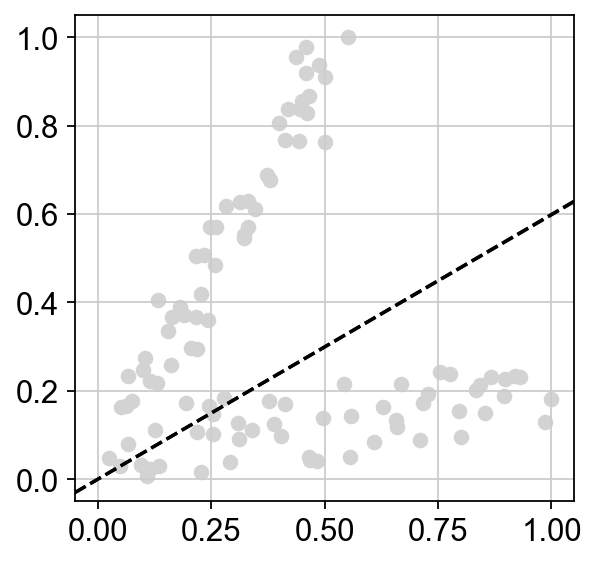
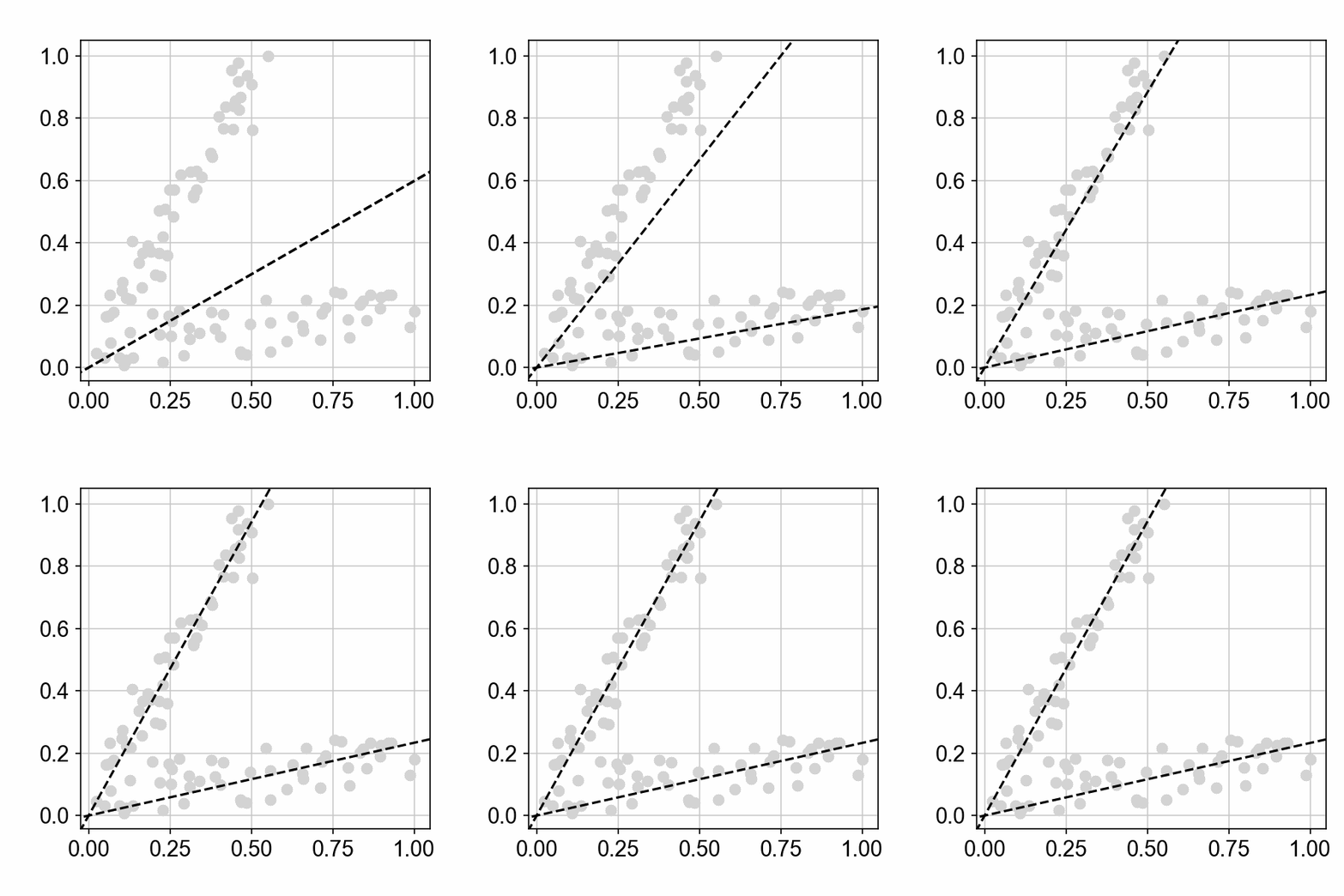
Here we have two nearly overlapping lines.
Optimization Loop for Parameter Tuning
import optax
optimizer=optax.adam(learning_rate=2e-2,b1=.9,b2=.999,eps=1e-8,eps_root=0.0)
The values above for b1, b2, eps and eps_root are Adam’s defaults. In the update rule below, $\alpha_t$ represents the learning rate and $\beta_1$, $\beta_2$,
$\varepsilon$, $\bar{\varepsilon}$ represent the arguments
b1, b2, eps and eps_root respectively. The learning rate is
indexed by $t$ since the learning rate may also be provided by a
schedule function.
# initialize Adam with our slope parameters to track
opt_state = optimizer.init(slopes)
opt_state
(ScaleByAdamState(count=Array(0, dtype=int32), mu=[Array(0., dtype=float32), Array(0., dtype=float32)], nu=[Array(0., dtype=float32), Array(0., dtype=float32)]),
 EmptyState())
We can see here the current state $S$ of the Adam optimizer, which is updated at each iteration.
mu and nu are the estimates of the first and second moments of the gradients (moving averages of $g$ and $g^2$), initialized at zero ($m_0$ and $v_0$). At each iteration they are updated and used to compute the parameter update $u_t$:
Let’s move on with the training:
all_slopes=[]
all_slopes.append(slopes)
losses=[]
for step in range(200):
    # calculate current loss and related gradients
    loss, grads = jax.value_and_grad(loss_fun)(slopes)
    # takes in the current optimizer state and gradients and
    # returns the updates that need to be applied to the parameters
    updates, opt_state = optimizer.update(grads, opt_state)
    # applies the updates from the gradient transforms to the current parameters to return new ones
    slopes = optax.apply_updates(slopes, updates)
    # saving slope params and loss output for current iteration
    all_slopes.append(slopes)
    if ((step+1) % 20 == 0):
        print(f'Step {step+1}, Loss: {loss.item()}')
    losses.append(loss)
Step 20, Loss: 0.08323252201080322
Step 40, Loss: 0.03936617076396942
Step 60, Loss: 0.01695091649889946
Step 80, Loss: 0.009481729939579964
Step 100, Loss: 0.008024180307984352
Step 120, Loss: 0.007884365506470203
Step 140, Loss: 0.007882850244641304
Step 160, Loss: 0.007882487028837204
Step 180, Loss: 0.007882184349000454
Step 200, Loss: 0.007882163859903812
Loss function
plt.plot(losses)
[<matplotlib.lines.Line2D at 0x30d12a990>]
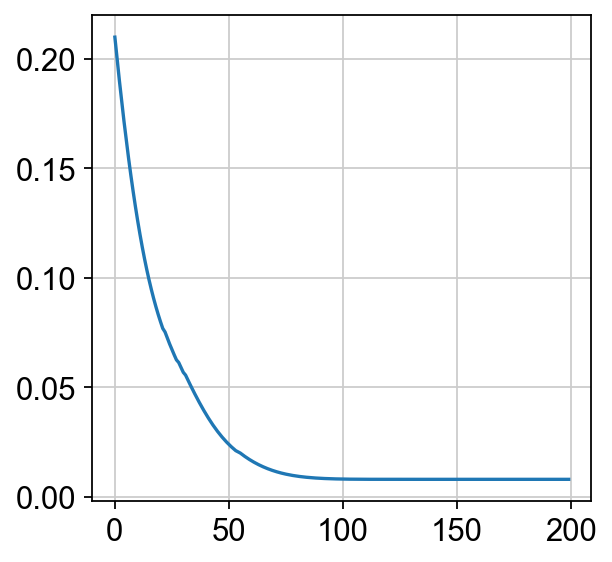
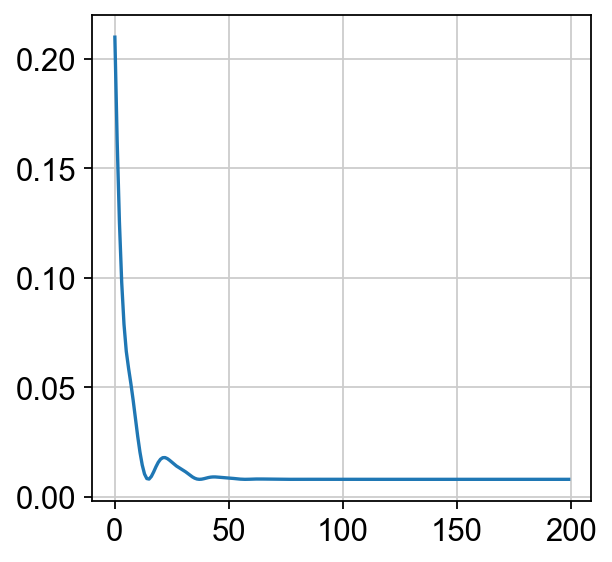
It seems we have converged within 200 iterations; let’s look at the learned linear fits:
sc.set_figure_params()
plt.scatter(xy[:,0],xy[:,1],c="lightgrey")
plt.axline([0,0],slope=slopes[0],c="k",linestyle="--",zorder=99999)
plt.axline([0,0],slope=slopes[1],c="k",linestyle="--",zorder=99999)
<matplotlib.lines.AxLine at 0x30d5ad790>
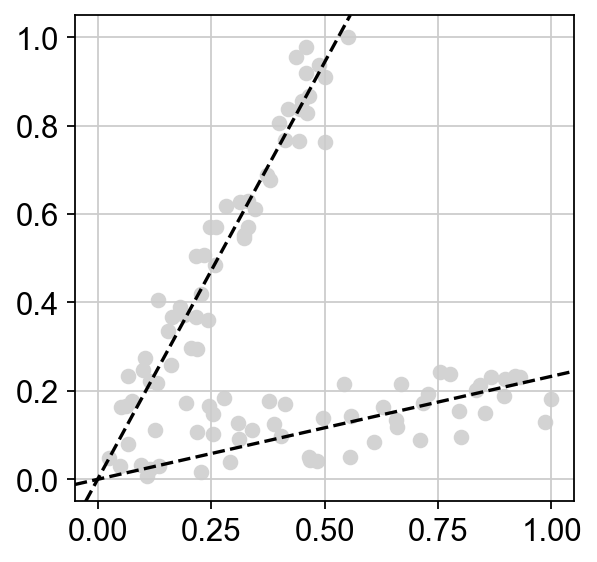
The model works well, we captured both processes!
Visualising the learning of parameters
It is quite fun to look at the actual updates of the slope parameters as the gradient descent occurs. Here is an animation of the two fitted lines during training:
import matplotlib.pyplot as plt
import matplotlib.animation as animation
import numpy as np
import matplotlib
from matplotlib.colors import Normalize

def generate_gif(xy, all_slopes, filename):
    # Set up the initial plot
    fig, ax = plt.subplots()
    ax.set_axisbelow(True)

    # Initialize colormap and normalization
    cmap = matplotlib.colormaps["bwr"]
    norm = Normalize(vmin=0, vmax=1)

    # Initial scatter plot
    sc = ax.scatter(xy[:, 0], xy[:, 1],color="lightgrey",linewidth=.5,s=50)

    # Initial axlines
    sl1 = all_slopes[0][0]
    sl2 = all_slopes[0][1]
    line1, = ax.plot([], [], 'k--', zorder=99999)
    line2, = ax.plot([], [], 'k--', zorder=99999)

    # Update function
    def update(frame):
        # Remove previous lines
        line1.set_data([], [])
        line2.set_data([], [])

        # Add new lines with updated slopes
        sl1 = all_slopes[frame][0]
        sl2 = all_slopes[frame][1]
        x1 = np.array([-10, 10])
        y1 = sl1 * x1
        x2 = np.array([-10, 10])
        y2 = sl2 * x2
        line1.set_data(x1, y1)
        line2.set_data(x2, y2)
        return sc, line1, line2

    # Create the animation
    frames = np.concatenate([np.zeros(30,dtype=int),np.arange(len(all_slopes))])
    ani = animation.FuncAnimation(fig, update,frames=frames,blit=True, repeat=True)

    # To save the animation using Pillow as a gif
    writer = animation.PillowWriter(fps=30,
                                     metadata=dict(artist='Me'),
                                     bitrate=1800)
    ani.save(filename, writer=writer)

    # plt.show()
    plt.close()
from IPython.display import Image
generate_gif(xy, all_slopes,filename='optim1.gif')
Image(open('optim1.gif','rb').read())
Trying a higher learning rate
Let’s increase the learning rate five-fold, from 0.02 to 0.1:
optimizer=optax.adam(1e-1)
s, _, _, _ = np.linalg.lstsq(xy[:,0].reshape(-1,1), xy[:,1].reshape(-1,1),rcond=None)
slopes = [s.ravel()[0],s.ravel()[0]+0.001]

opt_state = optimizer.init(slopes)
all_slopes=[]
all_slopes.append(slopes)
losses=[]
for step in range(200):
    loss, grads = jax.value_and_grad(loss_fun)(slopes)
    updates, opt_state = optimizer.update(grads, opt_state)
    slopes = optax.apply_updates(slopes, updates)
    all_slopes.append(slopes)
    if ((step+1) % 20 == 0):
        print(f'Step {step+1}, Loss: {loss.item()}')
    losses.append(loss)
Step 20, Loss: 0.01561565138399601
Step 40, Loss: 0.008163165301084518
Step 60, Loss: 0.007922415621578693
Step 80, Loss: 0.007900070399045944
Step 100, Loss: 0.007886435836553574
Step 120, Loss: 0.00788265559822321
Step 140, Loss: 0.007882176898419857
Step 160, Loss: 0.00788217131048441
Step 180, Loss: 0.007882164791226387
Step 200, Loss: 0.007882162928581238
plt.plot(losses)
[<matplotlib.lines.Line2D at 0x30fd78610>]
generate_gif(xy, all_slopes, filename='optim2.gif')
Image(open('optim2.gif','rb').read())
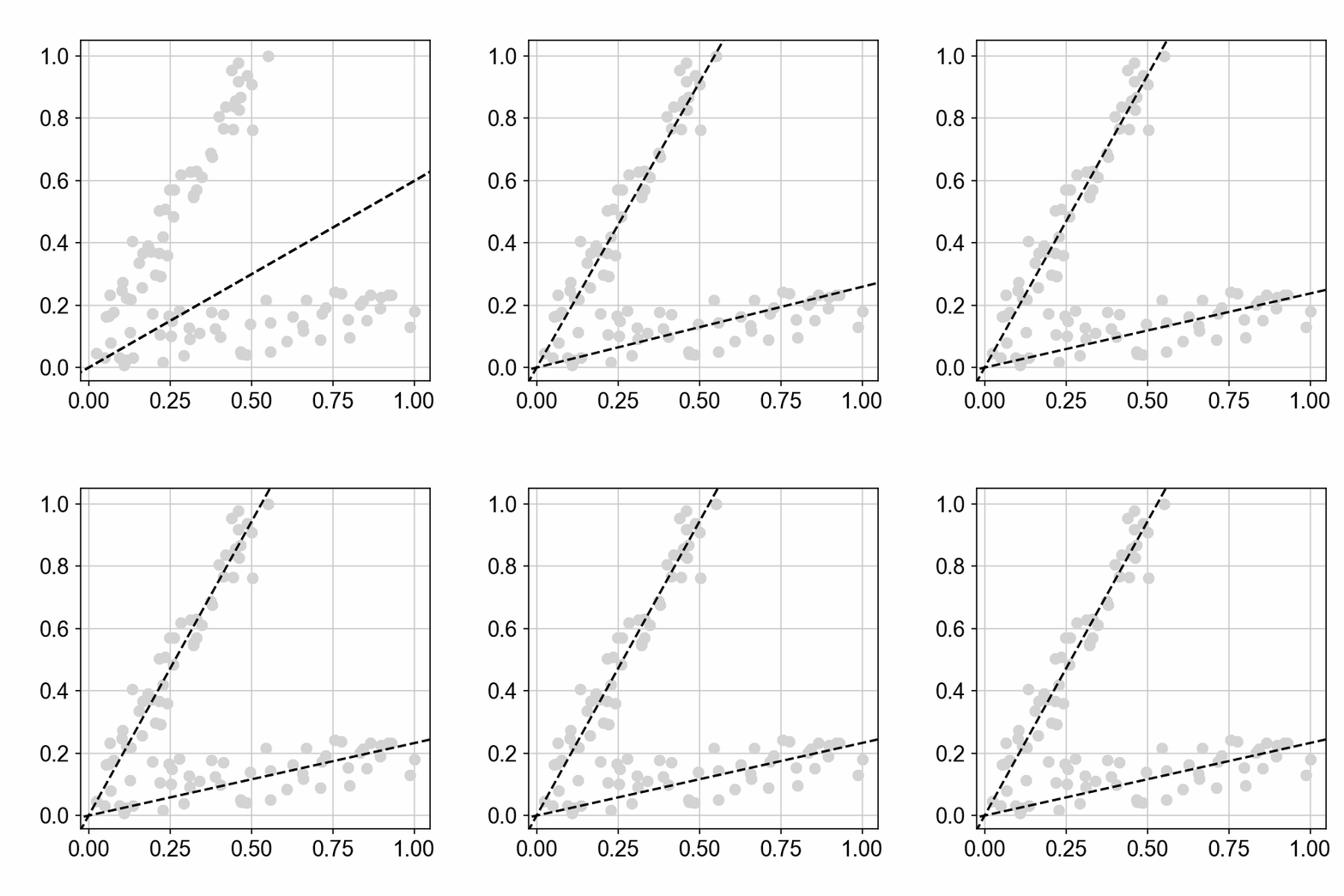
Here is a good example of the (spring-like!) momentum of the Adam optimizer: the larger learning rate leads to an overshoot of the slope estimates, which is progressively dampened as training progresses, and we even reach the minimum faster!
Estimating the performance of our model
Let’s have a look at how good our model is in recovering the two initial groups of points:
def get_assignment(xy, slopes):
    l1 = np.dot(xy[:, 0], slopes[0])
    l2 = np.dot(xy[:, 0], slopes[1])
    r1 = (l1 - xy[:, 1])**2
    r2 = (l2 - xy[:, 1])**2
    f1 = (r2-r1) > 0
    return f1

f=get_assignment(xy,slopes)
from sklearn.metrics import accuracy_score
print(f"accuracy score: {accuracy_score(group,f):.4f}")
accuracy score: 0.9800
We are doing a very good job at recovering the two underlying processes!
100X speed improvement with EM-inspired approach!
While gradient descent can be attractive and easy to implement, it is important to note that other approaches might be faster: enter expectation-maximization (EM)!
In this case, the “Expectation” step involves computing the binary assignments $b_{1,i}$ and $b_{2,i}$ for each data point $i$, based on the current estimates of the two lines $l_1$ and $l_2$. These assignments represent the membership of each data point to one of the two lines, based on the residuals $r_1$ and $r_2$.
The “Maximization” step involves re-estimating the parameters of the two lines $l_1$ and $l_2$ by performing a separate least-squares fit on the data points assigned to each line, i.e. weighted by the binary assignments $b_{1,i}$ and $b_{2,i}$ computed in the Expectation step.
By solving the two least-squares problems exactly in the Maximization step, instead of taking many small gradient steps on the overall loss function, we decouple the parameter estimation for the two lines, which can lead to much faster convergence.
Our approach is similar in spirit to the classical EM algorithm for Gaussian Mixture Models (GMMs), where the Expectation step computes the soft assignments of data points to different Gaussian components, and the Maximization step re-estimates the means, covariances, and mixing weights of the Gaussian components based on these assignments. In our case, the mixture components are linear models instead of Gaussians, and the assignments are binary (hard) instead of soft probabilities, but the overall iterative strategy is analogous to the EM algorithm.
s, _, _, _ = jnp.linalg.lstsq(xy[:,0].reshape(-1,1), xy[:,1].reshape(-1,1),rcond=None)
slopes = [s.ravel()[0],s.ravel()[0]+0.001] # we add a little offset to help the start of training

losses = [loss_fun(slopes)]
all_slopes = [slopes]
fs=[]
for i in range(10):
    # get binary assignment of points
    f=get_assignment(xy,slopes)
    fs.append(f)
    # estimate slope parameters for both sets of points
    s1, _, _, _ = jnp.linalg.lstsq(xy[f,0].reshape(-1,1), xy[f,1].reshape(-1,1),rcond=None)
    s2, _, _, _ = jnp.linalg.lstsq(xy[~f,0].reshape(-1,1), xy[~f,1].reshape(-1,1),rcond=None)
    slopes = [s1.ravel()[0],s2.ravel()[0]]
    # compute loss
    loss = loss_fun(slopes)
    if np.abs(losses[-1]-loss)<1e-9:
        break
    losses.append(loss)
    all_slopes.append(slopes)
plt.plot(losses)
[<matplotlib.lines.Line2D at 0x30fa5d710>]
sc.set_figure_params()
fig, axs = plt.subplots(3,1,figsize=(3.5,12))
for i,(ax,sl,f) in enumerate(zip(axs,all_slopes,fs)):
    ax.scatter(xy[:,0],xy[:,1],c=f,cmap="bwr")
    ax.axline([0,0],slope=sl[0],c="k",linestyle="--",zorder=99999)
    ax.axline([0,0],slope=sl[1],c="k",linestyle="--",zorder=99999)
    ax.set_title(f"iteration #:{i+1}")
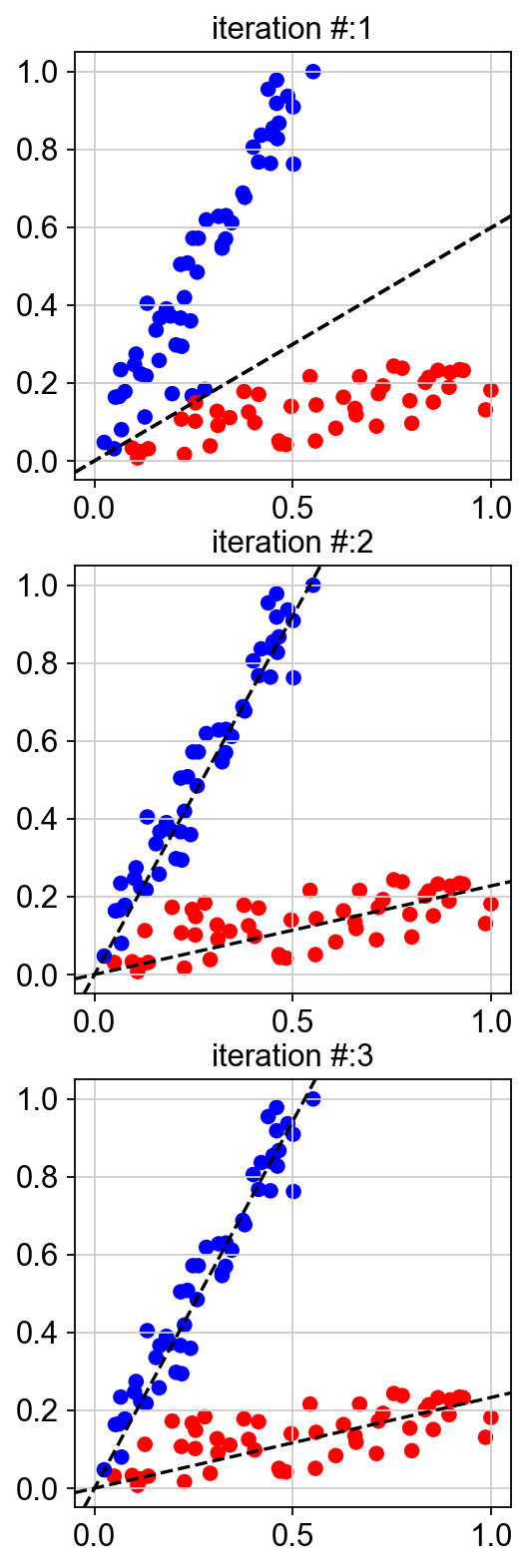
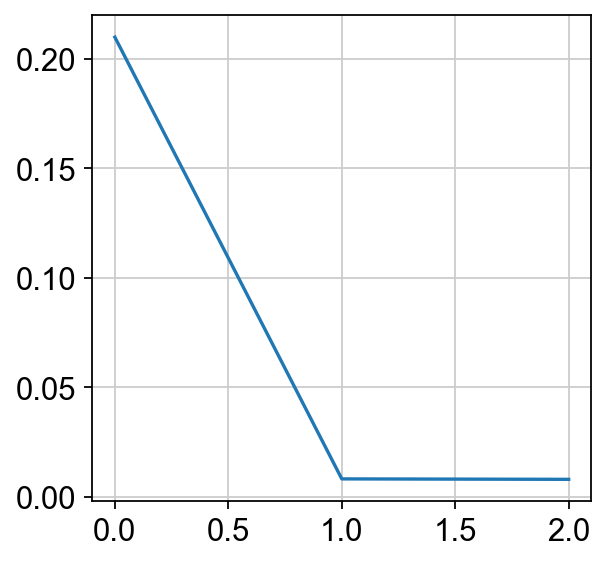
We reached the final result in only three iterations! This is much faster than gradient descent! The whole optimization loop took ~4ms instead of ~400ms for gradient descent.
